Dropbox to the rescue!
Dropbox has a feature called file requests that allow you to create a custom upload link and then share that with your group; and it takes just a few seconds to setup.
- If you don’t have a Dropbox account, get that setup quickly and take advantage of their free account level allowing you up to 2GB of online storage and file sharing.
- If you already have an account or once you have created one, visit dropbox.com/requests to setup your link.
- Click the Create a file request button

- Create a label for what you are requesting. If this will be a new section of your Dropbox account, a new folder of that name will be created automatically.

- Share the link that Dropbox has generated for you. It will look something like this – https://www.dropbox.com/request/5Bzo0JDHDizyUjqFH3nF
- If you want to get fancy, you can create a simplified link like johndoedesign.com/sharing at your domain that redirects to the Dropbox link or you can use Google’s URL Shortener to simplify it.
See? That was easy! Happy sharing!
]]>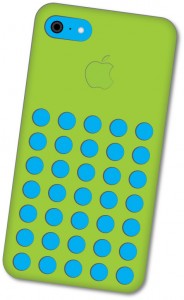 I have the opportunity of teaching an Illustration class on the college level and enjoy creating artwork and spurring students on in their creativity. My latest class project to inspire them on was to create an iPhone 5c using simple Illustrator tools. We are early on in the semester so I couldn’t get too fancy on them. I thought I would share the process for others that might benefit as well.
 The first step was to create a rounded rectangle for the body of the Phone. The color used here will actually be the case cover since the phone itself will show through the holes in the case.
The second step is to create the holes for the silicon skin. The gray stroke around the circle uses a variable width to give it some dimension and shadowing. 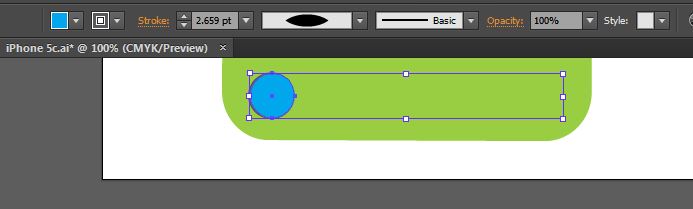
The third step is to duplicate the holes and then distribute them evenly using the align and distribute tools that are available in the top bar when multiple objects are selected. 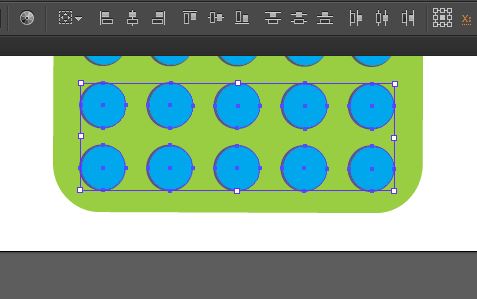
The fourth step is is camera. This was created by using the rounded rectangle tool to create the pill shaped cutout and then a series of circles to create the camera lens, microphone, and flash. 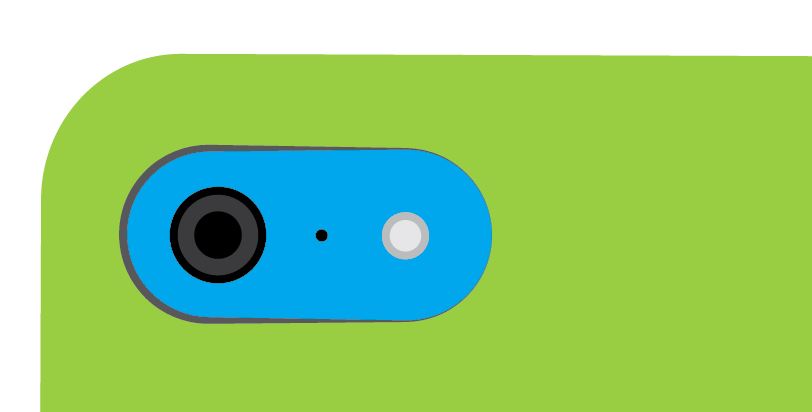
The next stage was the most difficult of the whole project – the Apple logo. This is created using the shape builder tool and the Direct Selection (white arrow) tool to manipulate the points into the correct shape. Logo step one was to create an ellipse in the approximate shape of half of the apple. 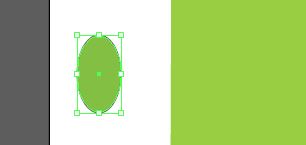
Logo step two was to duplicate the shape, position it properly, select both shapes and then use the shape builder tool to combine the shapes together by dragging across the shapes and creating one shape of the two. 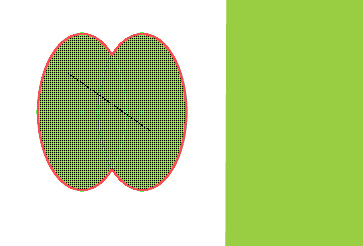
Logo step three is to convert the inner points of the combine shape into smooth points so that it would begin to look like the apple shape.
Logo step four was to manipulate the points with the white arrow tool to form the apple shape. Compare the image above with the one below to see the position of the anchor points. There was no need to use the Bezier handle to adjust the curves. 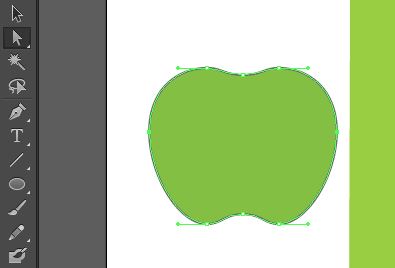
Logo step five was to create the bite out of the right side. This was done using the apple shape along with a circle and creating the bite with the shape builder tool. Select both shapes and switch to the shape builder tool. By holding down the alt/option key while dragging across the circle the bite out is created. 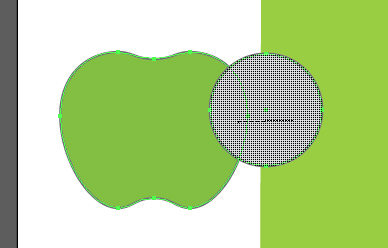
The final step of the logo was the leaf, which was created by using the ellipse tool and converting the top and bottom points of the ellipse into corner points. I adjusted the width of the leaf to make it a bit thinner. 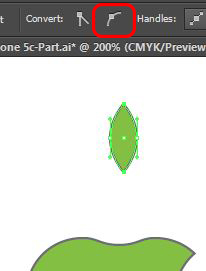 I also applied a variable width to the stroke of the logo in order to give it some dimension.
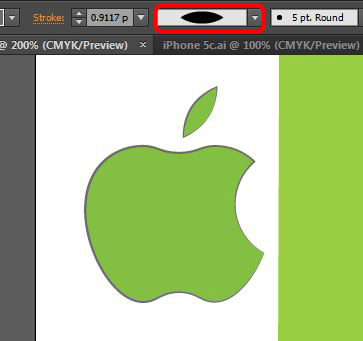
After positioning the logo in the appropriate location, the final steps to the phone was to apply a drop shadow and an inner glow. The inner glow blending mode was set to normal with black chosen as the color and the opacity and distance was set visually. 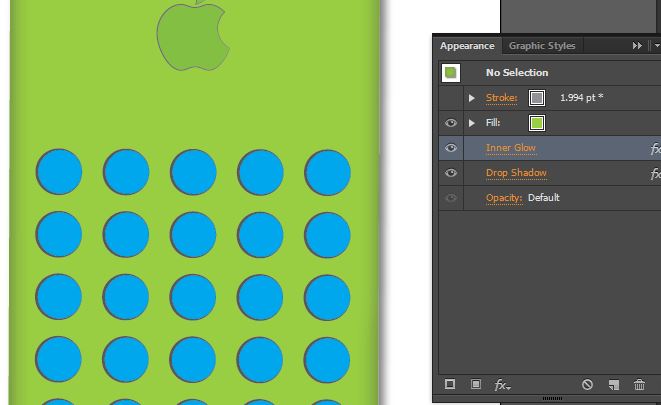
The final artwork was rotated slightly to enhance the look. 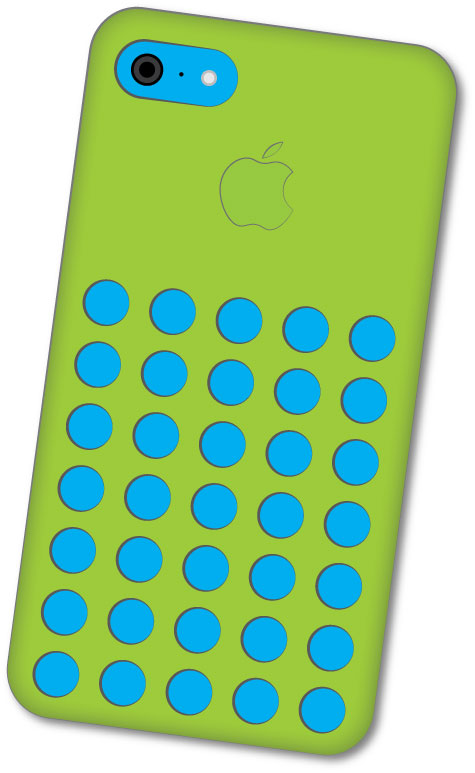
About a year ago I started using a newcomer to the scene called Cubby. I had been using the LogMeIn software for years and when they introduced Cubby, I thought I would give it a try. I sure am glad that I did! It has saved me so much time and hassle in regard to file syncing. For starters they offer 5GB for free in comparison to the 2GB offered by Dropbox. By referring friends you can get up to 25GB for free with Cubby so for no cost at all, it is a very viable cloud backup system.
The best part about it for me is that if I want to sync files to the cloud or my phone or work computer all I have to do is right-click a folder and make it a Cubby. I can then make that Cubby available on any other device that I want. It allows me to have ready access to my working files, saving me lots of time and hassle.
Now that I have tested it and proven how convenient it is, I thought I would introduce it to you. I’m on a drive to get the 25GB that I can for free so if this kind of convenience would help you, please sign up via my shared link – https://cub.by/i/00_BeOFcfLI-Cn.
Feel free to leave a comment if it helps you.
]]>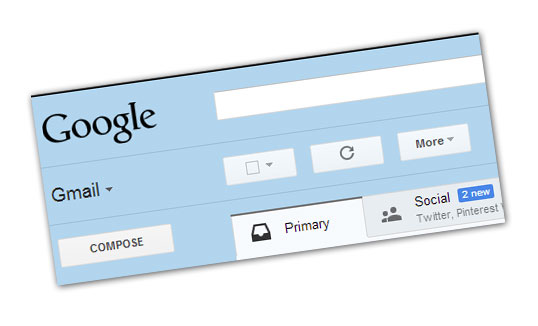
I really am a fan of Gmail. The way you can setup multiple accounts to work through one is an incredible time saver and organizational tool. It recently just became even better through the addition of inbox organizing tabs. I do receive a fair amount of “junk” mail but there is much of it that I want to continue receiving rather than unsubscribe. The new Gmail tabbed inbox tools do an incredible job of sorting my mail so that I still get it, but don’t have to be bogged down with it. I must confess that I never clean out my inbox. With the number of emails I receive it would be quite a chore to keep up with so the tabbed inbox organization is near-genius in my opinion. As you can see in the tabs, promotional and social network notification emails are neatly tucked away so that I can review them if I have time for that day or just ignore them if I don’t.
I have included picture examples of the three simple steps for you to enable this feature if you are interested as well. Happy emailing!
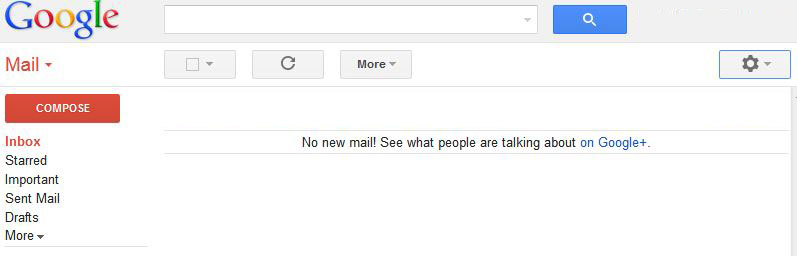
Step 1 – click the gear icon on the right-hand side of the screen.
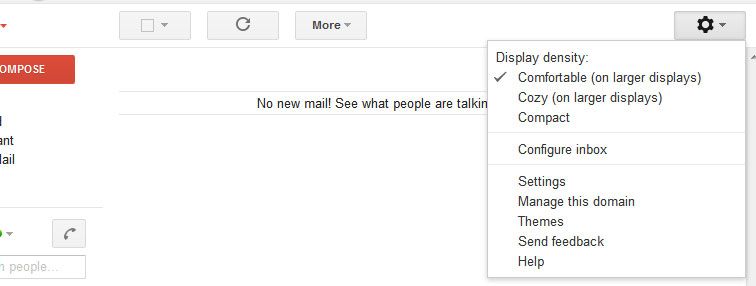
Step 2 – Choose the “Configure inbox” option.
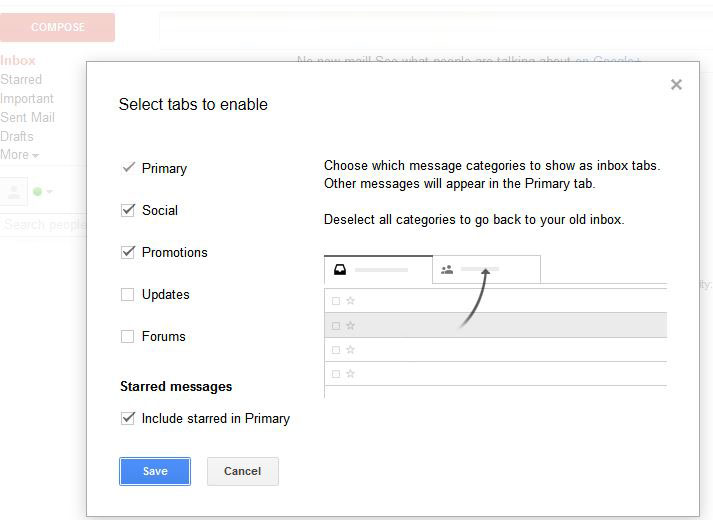
Step 3 – Choose the tabs that you would like to enable.
Simple as that. Your life now can be consumed with other things than reading pointless emails!
]]>I received a text from someone telling me that they want to purchase an item for their boyfriend and asking me to click a link to view the image of what they were looking for to see if it was the same as what I was selling. The link took me to a webpage for public image sharing – www.imgkey.org. Once there I was asked to download a GIMP plugin to view the images. GIMP is an open source (free) image editor that I have used before and the link looked legit but my suspicions were aroused and I did some snooping in regard to imgkey.org and found out that the link is a Trojan virus download. The imgkey.org url was just registered on May 27, 2013 – 6 days before I got the link so evidently this is a new way for them to distribute this virus.
Just another lesson in never blindly clicking a link that someone emails (or texts in this case).
URLs to stay away from – imgkey.org and gimpsoft.org. I’m sure that the culprits will just find other domains to use, but hopefully this will save someone or more the grief of a virus.
On a side note – If you are looking for a free image editor, GIMP is a decent option. Just download it SourceForge.net through their official download page – http://www.gimp.org/downloads/
If you want additional information about protecting yourself when selling on Craigslist, this book – How to Buy a Used Car A Guide to Avoiding Craigslist Scams & Lemons
There are many free options to where you should seriously consider switching if you have a Yahoo email account:
- Microsoft’s Hotmail received a face-lift a while back after it was moved into the Window’s Live family. It is now labeled as Outlook.com and has some very good features and benefits. My oldest standing email address is still with them.
- Mail.com seems like a good option if your shy on Microsoft. This may also be a decent business email option if you don’t have a unique domain name.
- Gmail is my preferred system because of the syncing that they have across devices, etc. I do keep a mildly concerned eye on their privacy practices though. I’m not exactly how I feel at this point when I get an email telling that one of my contacts have signed up for Google+ – it makes me wonder what else is being shared. Suffice it to say that I never email sensitive information or permanent passwords, etc. If I need to transfer that type of data I find a better way. If you need truly secure email, here are some good options.
- GMX Mail is another up and coming system that is worth a look.
If you need to have email for yourself or a team at your unique domain, contact us to help you get set up with a reasonable solution.
Which option you choose will depend on the feature set that you personally like best, but Yahoo has shown that it doesn’t care enough about the security of it’s customers to be trusted.
]]>How many did you get right?
How many people would identify your logo with your business if it was a part of the quiz?
Unless you are a Fortune 1000 company or have had some uncanny reach into their lives, probably few to none. Achieving brand recognition is a great thing, but let’s face it, a small business just doesn’t have the client base to allow them to be recognized by a swoosh like Nike has accomplished or simply by a color as UPS has done. Your business name simply must be a part of your logo until it has reached a saturation point in your target market.
That doesn’t mean your logo has to look like it was designed in a simple word processor program. Utilizing thousands of different fonts that are available and combining the text with simple graphical elements can make it first class with a modern appeal. Customization to an existing font can make the logo uniquely yours without the involvement of a full-scale custom logo design.
One of the main reasons to consider this approach is the cost involved. Logo design can be a huge expense and a very overwhelming process. While your logo choice is not a trivial issue, it should not be a consuming issue. If you would like to discuss some options that we can offer, please contact us today and we can help you with a logo in short order that will be a fraction of the cost and stress of the typical custom logo design.
]]>I have included the contents of an email that I received below for reference:
Subject: Tracking ID (W)LQ00 144 383 0888 0743
| Fed Ex | ||
| Order: KGH-8825-93562972 | ||
| Order Date: Thursday, 24 January 2013, 10:24 AM | ||
| Dear Customer,Your parcel has arrived at the post office at January 29.Our courier was unable to deliver the parcel to you.To receive your parcel, please, go to the nearest office and show this receipt. | ||
| GET & PRINT RECEIPT | ||
| Best Regards, The FedEx Team. | ||
| FedEx 1995-2012 |
]]>